Tech businessFraud alert
Scam page poses as Google Drive and gives users 30 minutes to “upgrade” — warn your staff
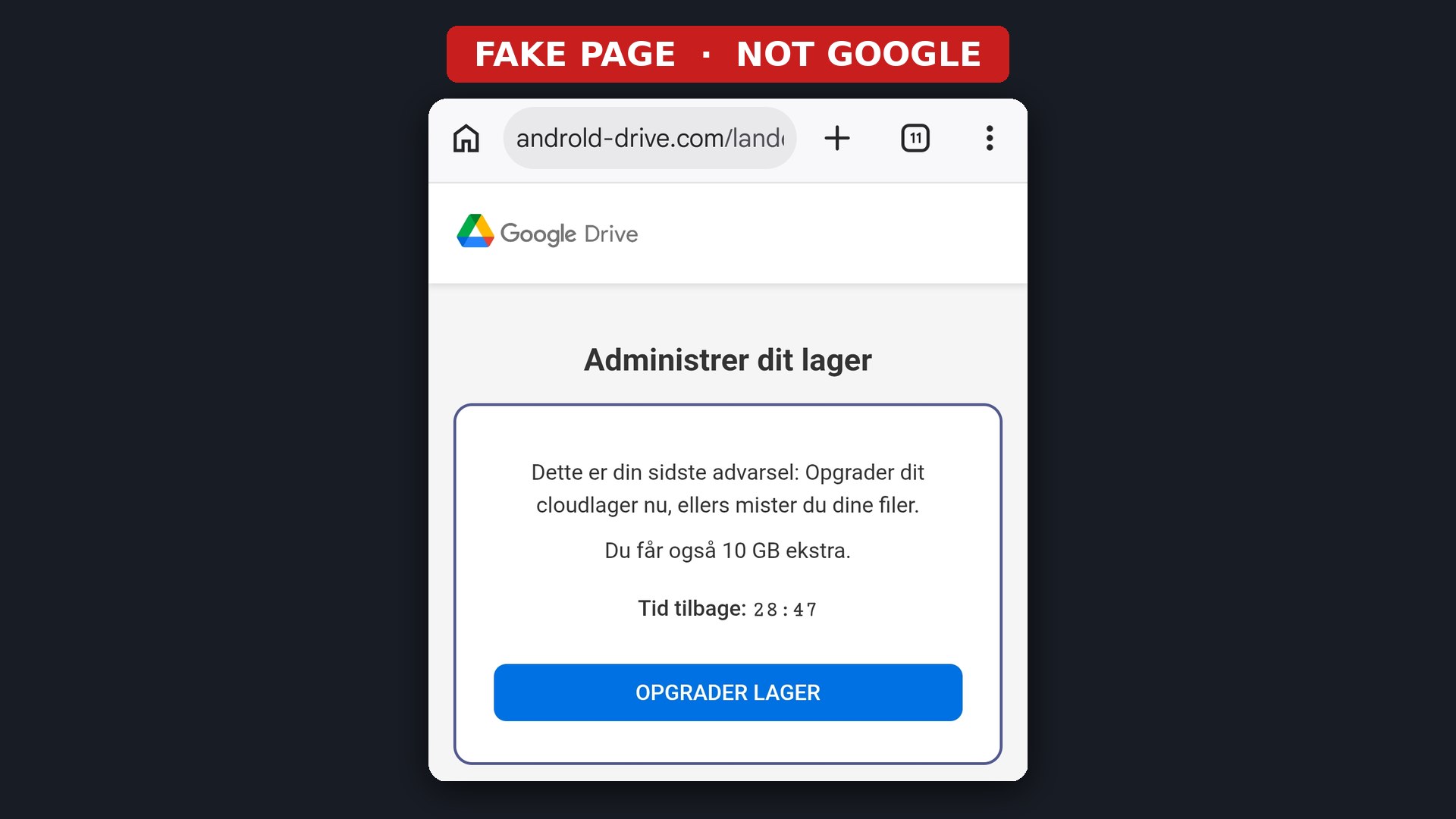
A look-alike site uses Google's logo, a countdown and a threat of lost files to push people towards a payment button. It showed up unprompted on an Android phone on Thursday.
Why it matters
Phones used for work hold company files and company cards. A convincing storage warning with a 30-minute clock is aimed at exactly the moment when someone pays first and asks later.
A website dressed up as Google Drive is telling Android users that they have 30 minutes to upgrade their cloud storage or lose their files. The page is not Google's, and businesses whose employees keep work files on their phones may want to pass the warning on.
A member of the Capital Edit team met the page on Thursday 19 November at about 06:40 Copenhagen time. It was on screen when Chrome was opened on an Android phone; no address had been typed and no advert tapped. Under Google Drive's logo, the Danish-language text read: “This is your last warning: Upgrade your cloud storage now, or you will lose your files.” It promised 10 GB extra, ran a countdown from about 30 minutes and offered one option — a blue button marked “Upgrade storage”.
The address gives it away: androld-drive[.]com, where a lowercase L stands in for the i in “android”. We did not press the button and cannot say where this page leads. We also do not know how the browser was sent there.
Where pages like this usually lead
Fake storage warnings have circulated widely this year. BleepingComputer described in January a months-long campaign in which the “upgrade” offer did not lead to any cloud service at all, but to affiliate pages selling unrelated subscriptions and to checkout forms that collect credit-card details. Malwarebytes, which traced one chain in February, concluded that the operators appeared to be paid for sign-ups rather than stealing passwords directly.
The threat itself does not match how the real service works. BleepingComputer notes that, according to Google, a user whose storage plan ends loses access to the extra space, and files are only deleted after two years — not after half an hour.
What to tell employees
- Close the tab. Never pay or enter card details on a page that arrived by itself.
- Read the whole address before trusting a logo. One swapped letter is enough to imitate a brand.
- Check storage only in the Google Drive or Google One app, or by typing one.google.com/storage yourself. For work accounts, storage and billing are handled by the organisation's administrator, not through a pop-up.
- If a company or private card has been entered, call the card issuer immediately and have it blocked.
- Report the page at safebrowsing.google.com/safebrowsing/report_phish/ so Chrome can warn others.
We will update this story if more becomes known about who is behind the page and how visitors are sent to it.
Sources
Written with AI assistance from the sources listed above. Its numbers were checked against those sources and the article was proofread before publication. Not investment advice. How we work